Once you have installed the Arduino IDE, open it up and click on preferences.
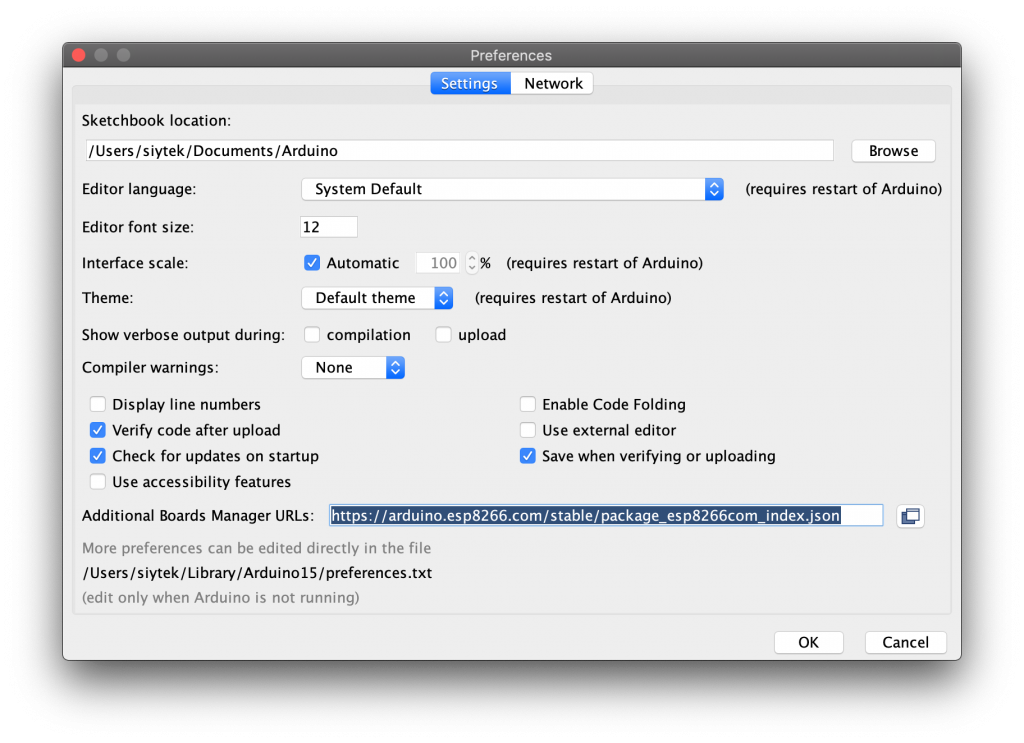
We will need to add the ESP board manager URL. Enter the following into the additional board manager URLs text box.

https://arduino.esp8266.com/stable/package_esp8266com_index.json

If you need to use multiple board managers, you can click the small icon to the right of the text box and enter multiple URLs.

RS232 Connector Pin Assignment
RS232 Cable Information
DB 9 and DB 25 Connection

The original pin layout for RS232 was developed for a 25 pins D sub connector.  In this pin-out provisions were made for a secondary communication channel. In practice, only one communication channel with accompanying handshaking is present. For that reason the smaller 9 pin version is more commonly used today.
The diagrams show the signals common to both connector types in black. The signals only present on the larger connector are shown in red.
Note: The protective ground is assigned to a pin at the large connector, in DB9 version protective ground connector to encloser.
For the DEC modified modular jack. Although is differential (the receive and transmit have their own floating ground level) still possible to connect RS232 compatible devices with this interface.

Read More