วิธีแก้ไข
คลิก Start -> ที่ช่อง Search programs and files -> พิมพ์ CMD แล้วกด Ctrl + Shift + Enter เพื่อเรียกใช้งาน Command Prompt จากสิทธิ์ของ Administrator
แล้วพิมพ์คำสั่ง slmgr<วรรค>-ato แล้ว Enter
) )
จะมีไดอะล็อกบ็อกส์ขึ้นมา ตรงนี้ รวมทั้งหน้าต่าง Command Prompt ก็ปิดไปได้เลย
) )
เมื่อเปิดหน้าต่าง System แล้วจะพบว่า…
) )
จาก sevenforums.com
- ไม่พอใจเรื่องลดราคาน้ำมัน พูดแต่ปากไม่มีประโยชน์หรอก เวลาไปเติมน้ำมันก็จ่ายเงินเพิ่มไปเลยลิตรละ 7 บาท ให้รู้ไปว่าไม่ได้เก่งแต่ปาก #
- กลุ้มใจ ลูกสาว@gumpun ดันไปคลั่งอีมดดำ คชาภา พญาเกย์ ทวิตถี่ยิบเลย #
- @gumpun อ้าวเหรอ แล้วมันใครอ่ะ พ่อไม่เห็นรู้จัก #
- @gumpun ก็เห็นสเปคแบบนี้ เลยนึกว่าใช่ 55555 #
- @gumpun อ๋อ ไอ้ที่หิ้วกระเป๋าเดินร้องไห้ แล้วเพื่อนๆก็แอบดีใจน่ะเหรอ #
- เพิ่งรู้ว่าการเป็นนักวิชาการมันง่ายอย่างนี้ ไม่ต้องคิดอะไรเพื่อแก้ปัญหา แค่คอยหาข้อติเวลาคนอื่นเขาแก้ปัญหาก็เป็นได้แล้ว #
- กลับถึงกำแพงแสน #
- Facebook ปรับให้แสดงภาพได้ใหญ่ขึ้น จาก 720 pixels เป็น 960 pixels http://j.mp/pxUOi7 #
- ไอดอลคนอื่นเขาเล่นคอนเสิร์ตใน Hall ในสนามกีฬา แต่ไอดอลตูดันเล่นคอนเสิร์ตตามวัด ตามสวน ยังดีที่ไม่ตีสังกะสีล้อมด้วย #
- มันมาอีกแล้ว! เต็มหัวเลย คืนนี้ฝนตกถล่มแน่ๆ #
- พายุไซโคลน เฮอร์ริเคน ไต้ฝุ่น วิลลี-วิลลี บาเกียว และพายุหมุนเขตร้อนคือพายุชนิดเดียวกันแต่มีชื่อเรียกต่างกันไปตามถิ่นที่เกิดเท่านั้น #
- เกิดในชายฝั่งตะวันตกของมหาสมุทรแอตแลนติกเรียกว่า เฮอร์ริเคน (Hurricane) เกิดในอ่าวเบงกอลและ มหาสมุทรอินเดีย เรียกว่า ไซโคลน (cyclone) #
- เกิดแถบนิวซีแลนด์และออสเตรเลีย เรียก วิลลี-วิลลี (Willy-willy) เกิดในมหาสมุทรแปซิฟิก เรียก ไต้ฝุ่น (Typhoon) #
- เกิดในหมู่เกาะฟิลิปปินส์ เรียก บาเกียว (Baguio) #
- เฮอริเคนไอรีน ถ้ามาเกิดในมหาสมุทรแปซิฟิคจะกลายเป็น ไต้ฝุ่นไอรีน ถ้ามาเกิดในมหาสมุทรอินเดียจะกลายเป็น ไซโคลนไอรีน #
- Comex วัยรุ่นอายุ 19 ปีผู้ทำเว็บ JailbreakMe ได้ประกาศบนทวิตเตอร์ของเขาจะไปร่วมงานกับแอปเปิลในสัปดาห์หน้า – ใครจะทำตัว jail ให้ล่ะทีนี้ #
- AMD ประกาศวันนี้ว่าบริษัทได้แต่งตั้ง Rory Read ซีโอโอจาก Lenovo ให้มาดำรงตำแหน่งเป็นซีอีโอคนใหม่ #
- เสาร์ไปสระบุรี อาทิตย์กลับกำแพงแสน #
- [Work] ทดสอบ Artisteer 3 #
- ปตท.-บางจาก ปรับลดน้ำมันเบนซิน91ลงลิตรละ7.17บาท น้ำมันดีเซลลดลงลิตรละ3บาท มีผลเที่ยงคืนของวันนี้ – เวรกรรม เพิ่งเติมซะเต็ม #
- ป้ายหน้าร้านก็ปิดไว้แล้ว บนเวบ บน Twitter บน Page Facebook ของร้าน ก็ประกาศแล้ว ลูกค้า่บังเกิดเกล้าทั้งหลายไม่ต้องโทรมาถาม"ร้านปิดเหรอคะ"นะ #
- ฝนตก…อีกแล้ว #
- Slide.com ขวัญใจชาว Hi5 โดน Google ที่ซื้อไปเมื่อปีที่แล้วสั่งยุบซะแล้ว กลายเป็นอีกตำนานของเน็ต #
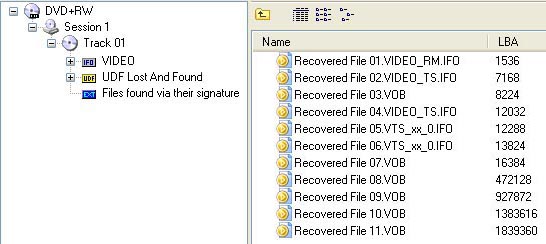
| In this article we start from one or more VOB files that were recovered with IsoBuster from a Movie DVD. Only the VOB files are usable as input files, IFO and BUP files can be discarded.
This article is mainly based on and inspired by an article on the videohelp.com website. The resulting DVD will contain one large Video sequence, no chapters nor menus, skipping can be done per 5 minutes. As example we use the VOB files that were found based on their signature. See the last example of the first article in this series: How to recover VIDEO data from a DVD with IsoBuster |
 |
- "I needed a password eight characters long so I picked Snow White and the Seven Dwarves." #
- I entered "penis" as a password once. The computer rejected it with "password error, not long enough"… #
- dtac 3G EXPO ที่ Royal Paragon Hall ชั้น 5 Siam Paragon ในวันที่ 3-4 กันยายน – จัดถี่กันจัง เอาเงินที่ไหนไปซื้อกันนักหนา #
- เฮ้ย! ฝนตกเอาซะหนักเลย ทีตอนกลางวันดันร้อนแทบตาย #
- ซัมซุงพูดในชั้นศาล แอปเปิลได้นำดีไซน์ไอแพ็ดมาจากภาพยนตร์คลาสสิกเรื่อง 2001: A Space Odyssey โดย Stanley Kubrik http://j.mp/nCJWSk – ทำไปได้ #
- งงกับปัญญานักการเมืองไทย ก่อนนี้โวยวายว่า 300 บาทมีปัญหาอย่าทำ พอจะไม่ทำก็ออกมาโวยวายว่า หาเสียงไว้ก็ต้องทำดิ ..จุดยืนอยู่ตรงไหนนอกจากส้นตีน #
- เห็นประชุมสภาเมื่อวานแล้ว สภาที่จะสร้างใหม่ไปสร้างไว้ 3 จังหวัดชายแดนเลยดีไหม จะได้สมกับผู้เก่งกล้าและทรงเกียรติขนาดนั้น #
- @gumpun ตกลงได้โทอะไรล่ะลูก #
- ประเทศนี้ไม่มีอะไรพอดี คนมีอำนาจก็ไม่มีสมอง คนมีสมองดันไม่มีอำนาจ #
ErrorCode : 80004002
สาเหตุ : เกิดขึ้นจาก MSN 2009 หรือตัว Beta ทั้งหมด
วิธีแก้ :
– Start -> Run
– พิมพ์ regsvr32 softpub.dll กด OK
– พิมพ์ regsvr32 mssip32.dll กด OK
– พิมพ์ regsvr32 initpki.dll กด OK
ErrorCode : 800b001
สาเหตุ: เกิดจาก MSN หาไฟล์พวก .dll บางตัวไม่เจอ ทำให้ไม่สามารถ sign in ได้
วิธีแก้:
– โหลดโปรแกรมนี้ไปแล้วกดเปิดครับ Click Here!
ErrorCode : 81000362
สาเหตุ: เกิดจากที่ตัว IE เปิด Work OffLine ไว้คับ
วิธีแก้: – ตรวจเช็คการตั้งค่าใน IE และ MSN
– เช็คว่า IE OffLine ไว้หรือป่าว
– เรียก Internet Explorer ขึ้นมาคับ
– กดที่เมนู File แล้วดูที่ Work Offline ว่ามีติ๊กไว้หรือป่าวถ้ามีให้เอาออก
– ตรวจเช็คการตั้งค่า Proxy ใน IE
– เรียก Internet Explorer ขึ้นมาคับ
– กดที่เมนู Tools –> Internet Options – คลิ๊กที่แท็บ Connections กดปุ่ม LAN Settings คับ – เอาตัวติ๊กทั้งหมดออกคับ – กด OK 2 ที
ErrorCode : 80048820
สาเหตุ: เกิดจากวันที่ของเครื่องไม่ถูกต้อง
วิธีแก้:
– โหลดโปรแกรมนี้ไปแล้วกดเปิดครับ Click Here!
- ไอ้ที่อดก็อดกันไป ไอ้ที่จมน้ำก็จมน้ำกันไป ไอ้ที่กัดกันก็ฟัดกันเข้าไป ..เมืองไทย ใครใคร่ค้าช้างค้า ใครใคร่ค้าม้าค้า #
- นับวัน Firefox จะสร้างความไม่ประทับใจมากขึ้น Firefix 6 ทั้งช้า ทั้งค้าง แต่ไอ้ที่ดีวันดีคืนกลับเป็น IE9 …ไม่น่าเชื่อ #
- ปัญหาที่ตามมาจากการออกเวอร์ชั่นใหม่บ่อยครั้งของ Firefox และ Chrome คือ Add-on เดิมใช้ไม่ได้ #
- Apple ฟ้อง Samsung เรื่อง Product ที่หน้าตาเหมือนกัน ดีนะที่ Browser ไม่ฟ้องกันบ้าง ไม่งั้นทั้ง IE Firefox Opera Chrome ได้ฟ้องกันเละเทะแน่ๆ #
- ละครน้ำเน่าด่าแย่งสามี การเมืองน้ำเน่าด่าแย่งอำนาจ #
- รื้อซ่อมเครื่อง Gas Analyzer ตัวเล็กแสนกว่าบาท พยายามดูว่ามันแพงตรงไหน ..ในที่สุดก็รู้ แพงตรงที่ทำเองไม่ได้ไง #
- เปิด Facebook เจอแต่หน้าลูกสาวเต็มทั้งหน้า กลัวพ่อไม่คิดถึงหรือไง อัพ status อะไรเยอะเชียว #
- พูดเก่งเนอะ ปากดีจริง อยากรู้จังขณะที่พูดกันในหัวคิดถึง"บ้านเมือง"หรือคิดถึง"บ้านกู"อยู่กันแน่ #