DVD307
- 30 Days Of Night 30วันหนีนรกฝูงแวมไพร์
- Bodyguard and Assassins 5 พยัคฆ์พิทักษ์ซุนยัดเซ็น
- THE INFORMANT
- The Fourth Kind
DVD307
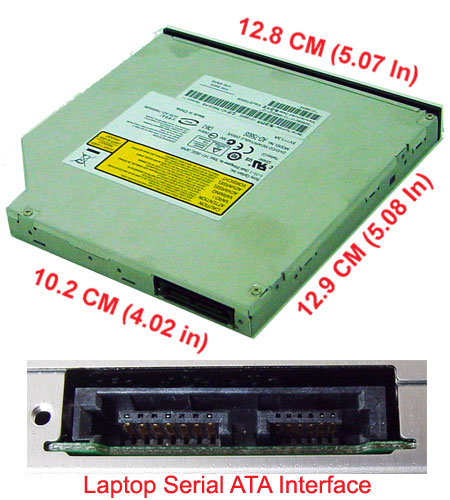
ใช้กับ Acer XX30, SONY VGN-NS110E,CS204J
The AD-7560S is a slim internal type with 12.7mm height and an IDE/ATAPI/SATA interface DVD R/RW/RAM recordable drive. The drive is able to write DVD+/-R/RW/RAM discs as well CD- R/RW discs and can perform as a regular DVD-ROM drive. The AD-7560S has 8X speed DVD+R disc writing, 8X speed DVD+RW disc writing, 6X speed DVD+R DL (Dual Layer) disc writing, 8X speed DVD-R disc writing, 6X speed DVD-RW disc writing, 6X speed DVD-R DL (Dual Layer) disc writing, 5X DVD-RAM disc writing, 8X speed DVD-ROM disc reading, 24X speed CD-R disc writing, 24X speed CD-RW disc writing and 24X speed CD-ROM disc reading capabilities. Furthermore, the AD-7560S supports all writing methods specified in industry standards and the functions of writing conform to them.
 Specifications
DVD306
DVD305
DVD304
Google FreeDNS : 8.8.8.8 , 8.8.4.4
OpenDNS: 208.67.222.222 , 208.67.220.220
DVD303
DVD302
DVD301
When you slipstream Service Pack 3 into your Office 2003 installation point, Office 2003 will be installed at Service Pack 3 level saving you the trouble of applying it afterwards. All you need is Office 2003 Service Pack 3 and the installation CD of Office 2003.
C:Office2003SP3-KB923618-FullFile-ENU.exe /t:c:o2k3sp3a /cD:setup.exe /a (where D: is your CD-ROM drive)msiexec /a C:o2k3pro.msi /p C:o2k3sp3aMAINSP3.mspNote 1: You can append /qb+ to the preceding command line to avoid receiving the Office 2003 Administrative Installation dialog box and the End User License Agreement dialog box.
Note 2: You can follow these instructions as well to include the hotfixes
*Replace with your msi name. Just a quick list to get the idea;
pro.msi = Office 2003 Professional
proret.msi = Office 2003 Professional Retail
std.msi = Office 2003 Standard
stdret.msi = Office 2003 Standard Retail
sberet.msi = Office 2003 Small Business Retail
If it ends with tri it is a trial edition; protri.msi